How to delete locked or unmovable files - Remove Access denided error in Windows

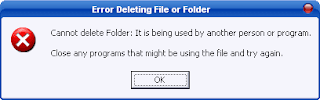
If you use your computer for normal daily needs more than only use facebook or watch youtube videos, you probably have come across situations were you can’t delete one or more files using the typical method. When you try to delete a file you get “Access Denied! Cannot delete the file. File is being used by any other program” error.
This happens because of virus programs, Registry errors or the files is opened by any software. but still you can delete it with some basic free softwares. in this post i will introduce you 2 small utilities than can help you to delete those locked content from your computer.

 First lets see the main error messages will occur when you try to delete locked files.

  • Cannot delete file: Access is denied
  • The file is in use by another program or user
  • Cannot read destination root or parameters
  • Make sure the disk is not full or write-protected and that the file is not currently in use
First lets take a look at the most popular tool "Unlocker 1.9.1"

unlocker is a very popular freeware. it can remove all connections to a file or folder just from few clicks. you don't have to go through task manager process tab or antivirus firewalls to close the file tasks running with those files or folders.

New added features in Unlocker 1.9.1 for 32 and 64 bit - 4/12/2011

- Improved UI: Progress bar when deleting large folders
- Improved UI: Fixed all references to previous website in UI
- Fixed Bug: Fix crash which happened with deep paths in old versions
- Fixed Bug: Fixed update check to match new Unlocker website (http://unlocker.emptyloop.com)
- Fixed Installer: Fixed x64 installer for references to non existing assistant
- Promotional feature: Fully optional Bing or Quickstores toolbar depending on location. 

How to use unlocker 

1)  Download and install unlocker 1.9.1 from here


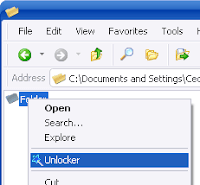
2)  Simply right-click the folder or the file that you want to delete, and select Unlocker from the context menu.
 

3)  If the folder or file is locked, a window listing of lockers will appear. Simply click Unlock All and you are done!

 .

Serial Keys - Most asked - Free Serials for Softwares

Want to run your favorite softwares as premium user?
Having problems when installing softwares?
Doesn't like trial version anymore?

Then here is the solution. I'll upload most asked Serial Keys for latest and often used softwares. You can request serials for your softwars also. but for few weeks we have closed our comments and chat section. we will put it again on next week. Book mark this page often to get new keys and Premium user codes for softwares. First of all I'll put few out web site visitor requests here. I'll update this page every time when i get useful Serial keys. Please click facebook like button at the top of this post. and share with your friends.

AVG Internet Security 2011 :-
8MEH-R6BFE-HWUHF-DPNDA-VFUWX-2EMBR-ACED
8MEH-RXYFD-JUV72-8922R-FTBZ6-QEMBR-ACED
8MEH-RFR8J-PTS8Q-92ATA-ORC6Q-JEMBR-ACED
8MEH-RS47Y-82HT8-GONVA-BCCCZ-DEMBR-ACED
8MEH-RXYFD-JUV72-8922R-FTDO8-QEMBR-ACED
8MEH-RGM33-K474L-6FGRR-8QEFN-UEMBR-ACED

Avast pro 6 - Full version ( You won't find this anyware )


W2334862R9900D1199-C00CBZYP
W83228769R9900F3599-7NL8USBS
S70862951R9900W0148-0LWNMN4P
S87387840R9900R8065-USYPSAVX
C06346240R9900T6999-KP18JKXJ
W06206137R9900C2147-U8528X68
S52581139H9900Z1393-CLL4M37N
W01575876H9900W2447-59SRR6NM
S10696481H9900X6760-AAYDFUY2
W73347370H9900A3198-FF8SWT68
W25175209H9900B4045-HW2SB742
S17525811H9900H1968-TYAA43RJ

Microsoft Office 2010 Professional Plus x64_x86 Activator


Adobe CS5 Master Suite


1325-1118-5864-4422-1094-1166
1325-1558-5864-4422-1094-1126
1325-1958-5864-4422-1094-1178

Trick your Friends by showing your computer as a CORE i3 ,i5 ,i7 or more

This is a simple trick that we use to change the processor name in system properties window. You can change this by using some softwares also. but this is the easiest way. Just simple registry editing only. You don't have to worry about this. because this is 100% safe.
You can change your processor name and speed details as you wish. You can show your Pentium 1 pc as CORE i7 :D

Now lets see how to do it.


* Go to Start menu and click run (Earlier windows versions) type REGEDIT and click ok
     OR
   Type REGEDIT in start menu search box.

You can get the RUN box by pressing Windows key + R

* Now you will see the Registry editor window.

go to
HKEY_LOCAL_MACHINE>HARDWARE>DISCRIPTION>SYSTEM>CENTRAL PROCESSOR
You might see few sub categories as 0,1,2 if your processor has multi threads. just change the value inside processor 0

Now on the right side you will see a option in the list named PROCESSOR NAME AND STRING


Right click on it and select MODIFY

Now change the value as you wish. you can get more processor details from this site if you want to add a real processor name or you can type whatever you want. now right click my computer and go to properties or check your processor with any software. it will show the name and values you entered. Now show it to your friends. Watch the picture below. My processor has 8 GB cache memery xD


Simple tool to split and join files - HJSplitter

Hjsplitter is a very simple tool that can Split files to parts and reassemble them. you don't have to install this. Just download and run. Also it is only a few kilobytes in size. so no need bigger compression softwares of splitters for your basic needs. Advantage of this software is you can use this Linux and other operating system platforms also.
This tool works great with every windows version from windows 95 to Windows 7. is there any compatibility issues? :)

Read more to get the download links.

Why should one want to split and recombine files? For instance, think of a file of 50 Mb, and try to send it to a friend, post it in a newsgroup or upload it to a Website or FTP server. It is usually easier to send/receive, upload/download smaller parts than handle the entire file in one go.

HJSplit can also be useful for backups. A file of e.g. 10 gigabytes in size can be split into smaller parts which then can be burned to CD's, DVDs, copied to USB sticks or uploaded to an online backup service. 

HJSplit for Windows and Linux support file sizes of over 100 Gigabytes, MD5 checksums, file-compare, "run without install" and both editions are fully portable. 

Most of times your Free movie and software downloads comes in *.001 file format. so you can join those files with HJsplitter to get the full file. 

When joining files the only thing you have to do is
  1. Copy all file parts to one foler
  2. open HJSplitter
  3.  Click join
  4. Browse and open *.001 file
Now HJsplitter  will find other files automatically and make the full file.

Download HJSplitter

Download Firefox 6 Portable version

Mozilla has announced it's latest Firefox product version. Firefox 6 comes with lots of improvements and support tools. You can Read more about Firefox 6 from here..  Most people doesnt like to change to fast for new web browsers. Thats why we posted this page for you. You can download the portable version of Firefox 6 from this page. You don't have to install it. just download and run. If you like it You can download the full version from here..

More details and Download links are posted below in this post.

Many of us like portable software because they don't need to install and we can carry them in our USB drives.
Many times we need portable version of a software to test it before installing.


So if you don't want to install Mozilla Firefox browser in your system but still want to try it, you can download the portable version and can directly run it without any installation.

You can also store it in your USB thumb drive and can carry it with you to use it anywhere you want.

Download Firefox Portable Version

If you like Firefox 6 features you can download the full version from here.

Twitter Delicious Facebook Digg Stumbleupon Favorites More