Cool Firefox Tab Browsing Trick

firefox cool tab browsing trick
This is an awesome widget available in Mozilla Firefox. This widget is disabled by default. You have to enable it. You don't have to install extra addons for it. This widget is called as "Tab Browsing" it is like Alt+Tab browsing in windows. You have to press Ctrl+Tab to use this widget. Every Firefox version has this feature But we have to enable it. Watch the video below to learn how you can enable this widget.

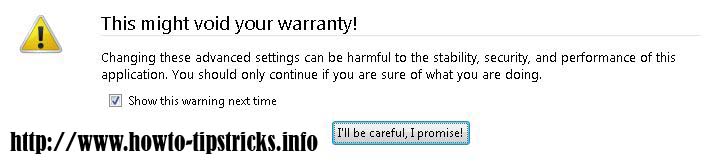
First Open a new tab on Mozilla Firefox and type "about:config" without quotes and press enter. it will open Firefox configuration window. Before that it will ask for the confirmation to load configuration window. because config window is very critical. You have to work carefully with unknown parameters. Click on "I'll be carefull. I promise!" Button to confirm it as shown in this picture

firefox console editing warning window


Now you can see the config window. Search for "Ctrltab.preview" on that window. select "browser.ctrlTab.previews" option as shown in this picture.


cool firefox tricks and tips tab previews


Double click on "browser.ctrlTab.previews" to change the default value to "True" When you install firefox it will automatically store its value as false. so we have to enable that widget by changing its vale to true. you can right click on it and select toggle to change its value too. After changing the value close that tab and try using Ctrl+Tab you will see that widget working well. Watch This video tutorial if you have any problems.


Free Online photo editing tool ~ Create Funny Photos and cards

create online funny photos and edit cards
A new post after a long time. Today im going to introduce you an awesome web site that we can use our photos and images to create cool effects, cards and posters. You can upload your images or use photos on other image hosting sites to use them on this web site. This is a Free online photo editing tool. you don't have to pay anything or register. Just go to site, Upload your images and add lots of effects easily to your photos. As you can see on above image you can create very cool stuff using this Free online photo editing tool. Lets start creating some photo editing. First Go to the Official site of fotoflexer.


You will see an upload button on the home page. 

upload images to online photo editing
Click upload button and upload any image file from your computer to fotoflexer web site. You can get images from photobucket, myspace, Facebook, Flickr, Picasa and lots of other image hosting sites and social networks. If you click on more places button you will see some other options to get images. you can put direct links to images also.

All tools are very simple and easy to use. there are simple drawing tools and some cool effects you can use on images. upload an image and test those effects. You can see more creative effects and tools on decorate tab as shown in following picture. you can create cards posters and face masks like i used in the first picture "The Harry potter santa". 

online photo editing tools

Try these effects and make your own facebook cards and banners and share with friends. 


Best Way to get Correct Google Search Results

If we want to find about something we use Google search engine to find it. Google is the most popular search engine. But sometimes we won't get correct answers. That because we don't use correct search requests.  There are few ways to get correct answers  on the Google search. All results are depending on the keywords that you are using. In this post i'll give some hints and few Google search tricks to get correct answers on Google search.

When you ask Google search Engine to find something, it will search your keywords on it's data base. Search results may depend on Keyword density and Page Rank of the matching pages. Most of the times pages with higher Page rank will appear first. So you have to enter the right search criteria in search request. if not Google will give you some sites with matching results, not what you exactly wanted. When you start to enter your keywords, Google will show you some suggestions related to your search. you can select one of them or enter full request. Following screen shot shows when i try to search about laser printers it shows me some suggestions about laser printers. also it shows the highest ranked page which does have information about laser printers.


Now im going to tell you the most important Trick, Use all keywords in search 

When you wanted to search something on google, you can get the best result by entering the full list of keywords. Think that you want to download Kungfu panda 2 movie. When you search for it Google will show you pages to watch it, Buy it, Download it with paid premium accounts and free download sites. so lets limit search results to free downloads by entering search request like this "Free Download Kungfu panda 2" Now google will show you sites which allows you to download Kungfu panda 2 for free. But there are many versions of it. Cam rips and very low quality videos. DVD rips, BRrips(BluRay)and versions with Embedded Subtitles. So we have to filter our search results again. Lets search to download BluRay Rip. 
                    Now our search request will be like this "Free Download Kungfu panda 2 BRrip" Google will show us all free download sites contains Kungfu panda 2 BRrip. not completed yet. there are many ways you can download it. Torrents( Which needs torrent software like bittorrent ), Direct Link downloads( Most of the times you will need paid premium accounts ), Rapidshare and mediafire links. personally i prefer downloading movies with Mediafire. It's easy and you can download multiple files using Internet download manager. Unlimited download speed with new media-fire site. lets search for mediafire links to download our movie. so change Search request like this. "Free Download Kungfu panda 2 BRrip Mediafire links" seems that enough. you will get all sites that include mediafire links to download Kungfu panda 2 for free.
Thats the way to get the best result. Put all keywords in the search request to get the perfect result on the top of the search result. It will save your time. hope this will help you. In next post i will post another great search tricks to get  more easier and accurate search results. So visit us again. Like our Facebook Fan page and Subscribe to Rss feed or E-mail Subscription. 
.

What is Cloud Computing, Cloud Technology | Secured File hosing in Cloud Servers

What do you Know about the Cloud technology. Cloud is a new idea for secured and well organized computer usage. Software Engineers and other Computer professionals have done lots of improvements to the Cloud system. Cloud means some highly secured area to store your data as an online backup. Or you can permanently Store your files on the Cloud and use them from anywhere you go with any device like Laptops, Desktops even your mobile phone with internet connectivity. Cloud Storage is more secured than other file storage methods and File hosting methods. Because Cloud Storage  is  more powerful and Well secured technology. No one  can hack into Cloud Servers. Lets read How we can get Cloud services and Advantages of using Cloud Servers.


When you have a private files or documents on a Cloud Hosting Server, You are the one who have the access for those files. No one can use them or hack in to it. Lots of people starting to use Cloud Servers because this advanced security features in Cloud Storage devices. Lets see what are the advantages of using Cloud Storage

Advantages of using Cloud Storage
* Cloud is a Very big storing space. When you using Cloud Hosting, you don't need to buy extra hard disks to store your data or keep secondary back up for them.
* Cloud is well  secured File storing system. Because of that Cloud Servers are the best place to store your important and private data.
* Your Computer or Hard disks might stop working. What if your hard  disk suddenly stopped working? You will loss your data. Cloud has the best hardware and new tools. they are ready to work 24x7 without any problems.
* Some people might think that they have backups in another hard disk so they don't have to worry about. but imagine an accident like a fire or some thing. what if your computer system completely unusable after that? That's why you have to use Cloud  Hosting.
* You can always Sync your data with Cloud Servers. so you don't have to worry about your files. You can access the backup of your files on the Cloud From anywhere in the world.

Here im giving you a Free Cloud Hosting Software. This is very easy to use. Just Download and install small client software and Upload and use 2GB of online Cloud Server Space. it  has all basic file  sharing features and you can increase your Cloud Space uo to 10 GB for free. Click this Image to Get Your Free Cloud Hosting package

Click this yellow image to Download DropBox. Normally you will get 2GB Cloud Storage from Drop Box. But when you register through our site  you will get extra 250 MB and  you can earn up to 10GB free storage. try it now. Make your free account and reserve your storage before this offers going to stop. I don't think they will keep giving people extra free hosting. so better to get registered before those offers finished. you can use it when  you wanted. Registered users will have all benefits even after they have stopped giving free Cloud accounts anymore.


I will post how to use Drop Box to upload and use them. Like our Facebook Fan page to get notified when we post about more Cloud server offers and Drop Box and other free cloud software tutorials. you also can subscribe to our free E-mail service to get our new posts directly to your E-mail account.
.

Google is going to Track facebook chat and Comments | Facebook Web Traffic

Facebook has introduced lots of new Features recently. Few days ago they have introduced the Facebook chat subscribe for the plugin they have made to use in blogger  pages and web sites. This will be the next version of it. When you subscribed to someones comments on a blog, it will  give notifications to you when he comment on that blog. That is the difference between Profile Subscription and Comment Subscription. Let's see some details and advantage  of this new Facebook comment indexing feature.

I Don't know why Facebook has given permissions to Google to access the Facebook chat and comments. That means third party sites can spy  on our chat history. That is something i won't like. it feels Facebook giving our privacy opened to others. Anonymous Hackers Team  said that facebook sell our details to third party Organizations and Government. Finally they have proved  that they going to reveal our privacy to another company.

Anyways there are a good side also. This will be better than Comment Subscription. Because when Google can index comments on pages and blog posts we can search for the comments as we do for blog posts. It will be useful to find a post in a blog which  have lots of similar type posts. 


Google will index comments both inside and outside from Facebook. When you use Facebook comment box on a blog like i used in this blog, Google bot or spiders will index comments while indexing posts. If you  like to know more about How Google bot index blog posts and Add your blog to Google Search engine with optimized better SEO tricks, Download this Free Search Engine Optimization E-Book written by Google  web masters. 
  
Still they don't index Facebook comments. Google still developing this system. It might take little time to develop and release. Let's wait till then. With indexed comments Facebook will give us lots of good SEO and keyword density.
                Don't forget to Like our fan page and leave a comment before you read another post. smile smile

.

Twitter Delicious Facebook Digg Stumbleupon Favorites More